SEA.AI Software Release 4.4 makes everyday use of your system simpler. Recorded AI Feedback is easier to review on Sentry and Watchkeeper, and Sentry gets a more direct way to check detections and a smoother zoom.
What's New at a Glance
Product | What’s New |
|---|---|
SEA.AI Sentry | Downloadable AI Feedback recordings, detection cards opened from the map, smoother zoom. |
SEA.AI Watchkeeper | Downloadable AI Feedback recordings |
The main improvements in SEA.AI Software Release 4.4 include:
- Downloadable AI Feedback recordings. AI Feedback recordings can now be downloaded and replayed, making it easier for users and support team to review recorded video data.
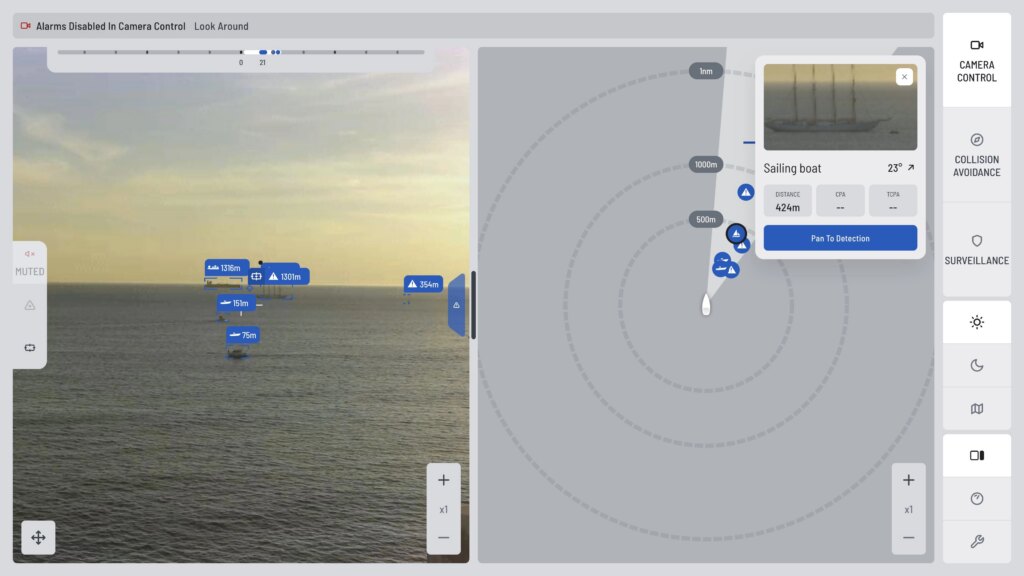
- A simpler way to review detections (Sentry). The detection list is gone. Tap a detection on the map to open its detection card instead.
- Smoother zoom (Sentry). Stream zoom levels have been adjusted for a smoother experience.
SEA.AI Software Release 4.4
Download and replay AI Feedback recordings
You can now save an AI Feedback recording to your device and play it back whenever you need. Users and support teams can look at the same recorded video data, so it is easier to see what happened and to talk it through together. This works on both SEA.AI Sentry and SEA.AI Watchkeeper.
A simpler way to review detections (Sentry)
The map is now the place to check a detection. Tap it, and a detection card opens with the details, right where the detection appears on screen. With no separate Detection List to go through, you stay focused on the view you are already using.
Smoother Zoom (Sentry)
Zooming in the Sentry app now feels smoother, thanks to adjusted stream zoom levels. Moving between zoom levels is more even, so it is easier to take a closer look at what is around you.
How to update your system
You can update your system in three simple ways:
- Directly from the SEA.AI App (recommended):
Just connect your phone and the SEA.AI Sentry to the same onboard Wi‑Fi network. The app will guide you through the update process — fast, simple, and without accessing any portal. - Via the SEA.AI Connect Portal:
Log in to your account and download the update package from your device page. - From our Document Library:
Access the latest Sentry software file and Watchkeeper software file.
FAQs
Which products does SEA.AI Software Release 4.4 apply to?
Downloadable AI Feedback recordings are available on both Sentry and Watchkeeper. The map-based detection cards and the smoother zoom are Sentry features.
What replaces the Detection List on Sentry?
Detection cards. Tap a detection on the map to open its card with the details.
How do I get SEA.AI Software Release 4.4?
Update from the SEA.AI App, the SEA.AI Connect Portal or the Document Library. See the upgrade section above for the steps.